"its broken on my phone lol" becomes something you can work from
Real reviewers write in a hurry. ClickCues reads the comment with its page context, produces a clear title, a usable description, and a suggested severity, and keeps the original text exactly as it was written.
AI feedback intelligence in ClickCues is a processing step that runs after a submission is saved. It reads the reviewer's comment together with the captured page context, writes a clearer title and description, suggests a severity, and compares the result against recent items to flag likely duplicates. The reviewer's original wording is always kept.
Free 7-day trial · Card only at checkout · Manage from Settings
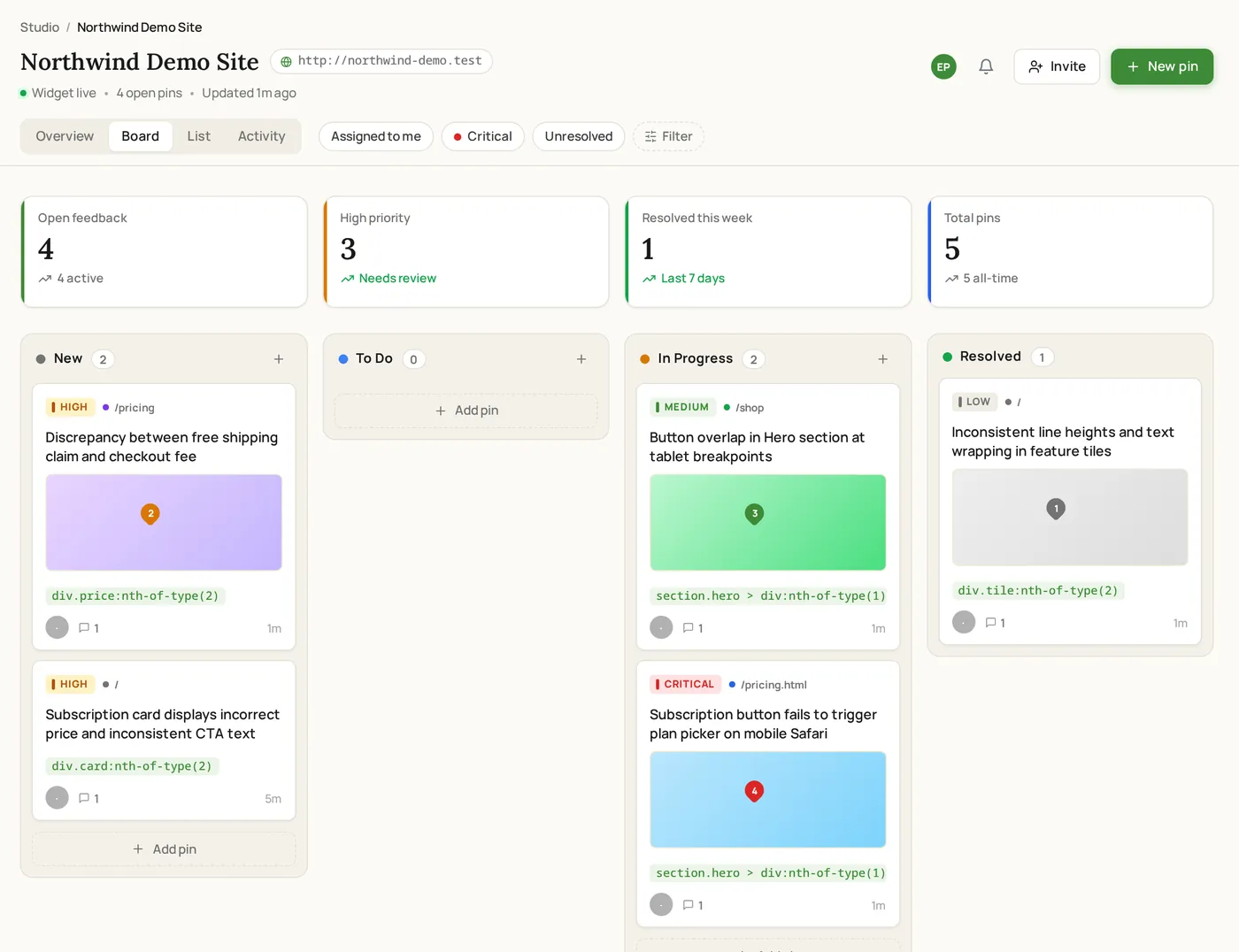
Clear feedback. Fewer revisions. Faster launches.
Used by freelancers, agencies, and marketing teams
Try the widget
The reviewer side, state by state
Switch between the states a reviewer actually moves through. This is the real widget interface, not a rendering of it.
A raw comment next to its AI-written summary
The Problem
The gap between what was written and what you need
The Old Way
- One-line comments that name a problem without describing it
- Someone has to rewrite every submission before it can be assigned
- Five people report the same thing and it becomes five tasks
- Nothing indicates whether an item is cosmetic or launch-blocking
The ClickCues Way
- A clear title and description written from the comment plus its context
- The rewrite happens automatically, in the background, before you look
- Likely duplicates are flagged with a confidence score during triage
- A suggested severity gives triage a starting point you can override
Before and after
What the cleanup step actually changes
These are illustrative of the transformation, not customer data. The pattern is the same each time: the comment stays, a workable version appears next to it.
What arrives
"the thing at the top doesnt work on my phone"
What your team works from
Header navigation unresponsive on mobile. The reviewer reported the top navigation not responding on a mobile viewport at 390px on the pricing page.
Context from the capture fills in what the comment left out.
What arrives
"text too small here"
What your team works from
Body copy below minimum readable size in the features section. Reviewer flagged the paragraph text in this section as too small to read comfortably.
A vague complaint becomes a locatable change.
What arrives
"broken"
What your team works from
Reported failure on the checkout page. The reviewer marked an element as broken without further detail; page, viewport, and browser are attached for reproduction.
When the comment says nothing, the summary is honest about it rather than inventing detail.
Scope
What the AI does and does not do
Deliberately narrow. This is a cleanup and triage aid, not an autonomous agent.
- It summarises
- Writes a concise title and a short description from the comment and its captured context.
- It suggests severity
- Proposes low, medium, or high as a starting point for triage. Your team decides the final priority.
- It flags duplicates
- Compares the new item against recent project items and marks a likely match with a confidence score.
- It never overwrites
- The reviewer's original title and comment are preserved on the item, so nothing is lost in translation.
- It does not act
- Nothing is assigned, closed, merged, or replied to automatically. The AI produces a draft, people make decisions.
- It runs after submit
- Processing happens in the background once the submission is saved, so the reviewer is never left waiting.
Real screenshots
AI output from real feedback
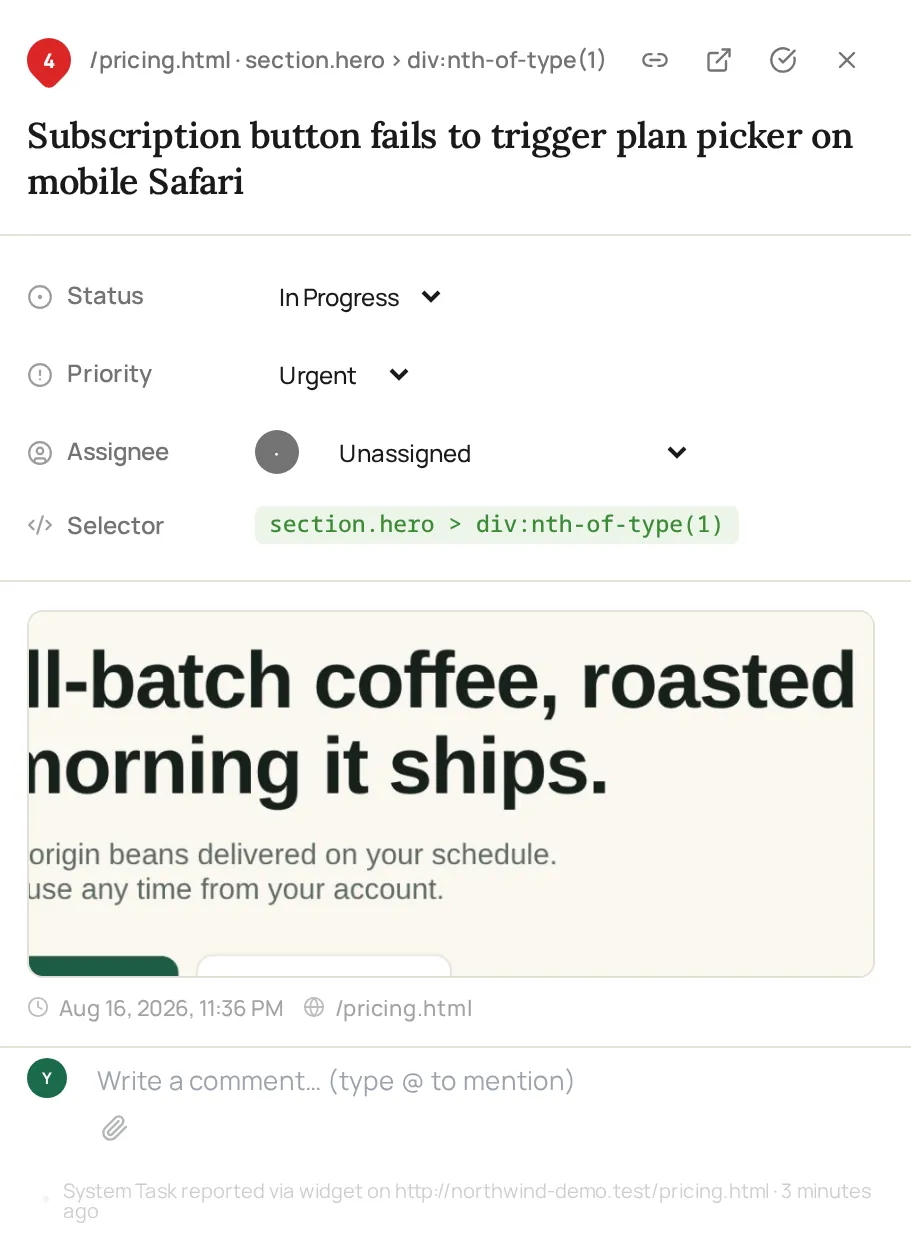
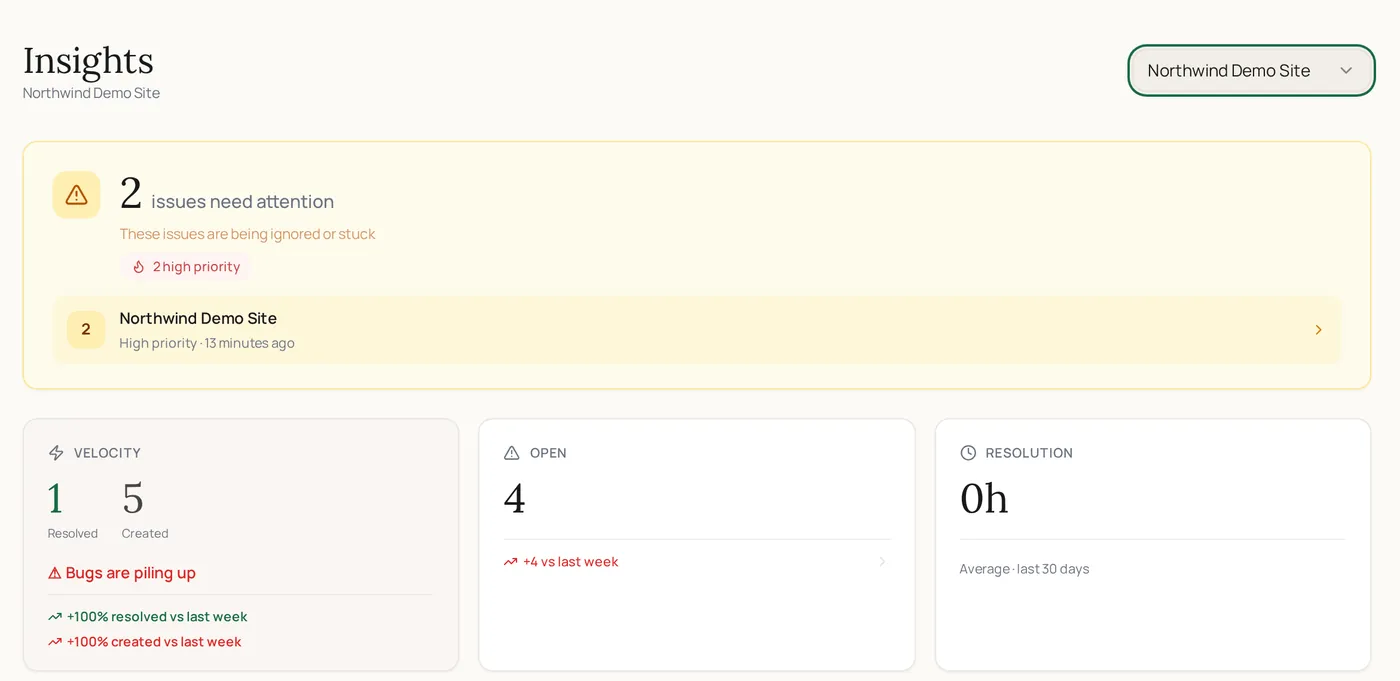
Both frames show unedited output from demo feedback submitted through the widget: an AI-written title and priority, and project insights.
How it works
Where the AI sits in the workflow
One step, between the submission being saved and the item reaching your triage.
The submission is saved first
The reviewer gets their confirmation immediately. Nothing about the AI step delays or blocks the person leaving feedback.
The comment is read with its context
The model sees the comment alongside the page, browser, and viewport that were captured with it, which is what lets a two-word note become a specific description.
This looks weird on mobile and the button is messed up
A clean version is written
A concise title, a two to four sentence description, and a suggested severity are attached to the item. The original stays exactly as submitted.
On the pricing page mobile view, the primary CTA overlaps the paragraph below.
Recent items are checked for a match
The cleaned-up text is compared with recent project items. A likely duplicate is flagged with its confidence so you can merge instead of re-fixing.
Features
The four things it produces
This looks weird on mobile and the button is messed up
A title someone can scan on a board
Short, specific, and written from the actual comment rather than a template, so the board is readable without opening every card.
On the pricing page mobile view, the primary CTA overlaps the paragraph below.
Two to four sentences your team can act on
The description pulls in what the reviewer said and what the capture recorded, which is usually enough to start work without a follow-up question.
On the pricing page mobile view, the primary CTA overlaps the paragraph below.
A starting point, not a verdict
Low, medium, or high is suggested per item. It is a triage aid, and your team's priority always wins.
Five reports, one piece of work
New items are compared against recent ones and flagged as a possible duplicate with a confidence score, so repeat reports collapse during triage.
At a glance
What each submission gets
Who benefits most
Teams whose reviewers are not technical writers
Keep exploring
What happens either side of this
- Screenshot capture
The visual evidence the summary is written against.
- Feedback board
Where the cleaned-up item lands for triage.
- Team collaboration
How your team works the item once it is readable.
- Dev & QA teams
Reproduction context for technical work.
- How ClickCues works
The end-to-end workflow around this step.
FAQ
Questions about the AI step
Last updated: August 2026
Stop rewriting your clients' feedback.
Start your 7-day free trial and let every submission arrive in a form your team can use.