Visual feedback tool for website review
Written feedback is a description of a problem. Visual feedback is the problem itself, pointed at. ClickCues moves review onto the page so nobody has to interpret what "the bit under the header" means.
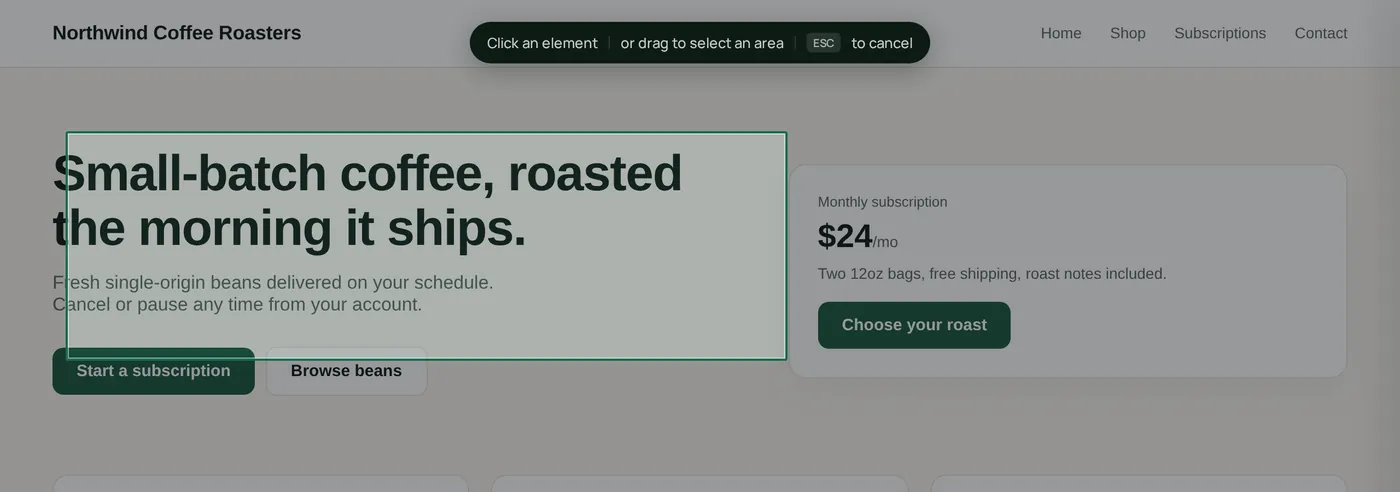
Visual feedback is website review where the comment stays attached to the thing being discussed. In ClickCues, a reviewer comments on the page itself and the note arrives with the page URL, the element that was clicked, the browser, and the viewport, so the team reading it does not have to reconstruct what the reviewer was looking at.
Free 7-day trial · Card only at checkout · Manage from Settings
Clear feedback. Fewer revisions. Faster launches.
Used by freelancers, agencies, and marketing teams
Try the widget
The reviewer side, state by state
Switch between the states a reviewer actually moves through. This is the real widget interface, not a rendering of it.
A pinned visual comment on a live web page, with page and viewport context attached
The Problem
The cost of describing instead of showing
The Old Way
- Reviewers describe a location in words, and the team guesses which element they meant
- Half a review round is spent asking "which page, which screen size?"
- Feedback and the thing being reviewed live in two different tools
- Round two repeats round one because the first note was ambiguous
The ClickCues Way
- The comment is left on the page, so the subject of the feedback is never in doubt
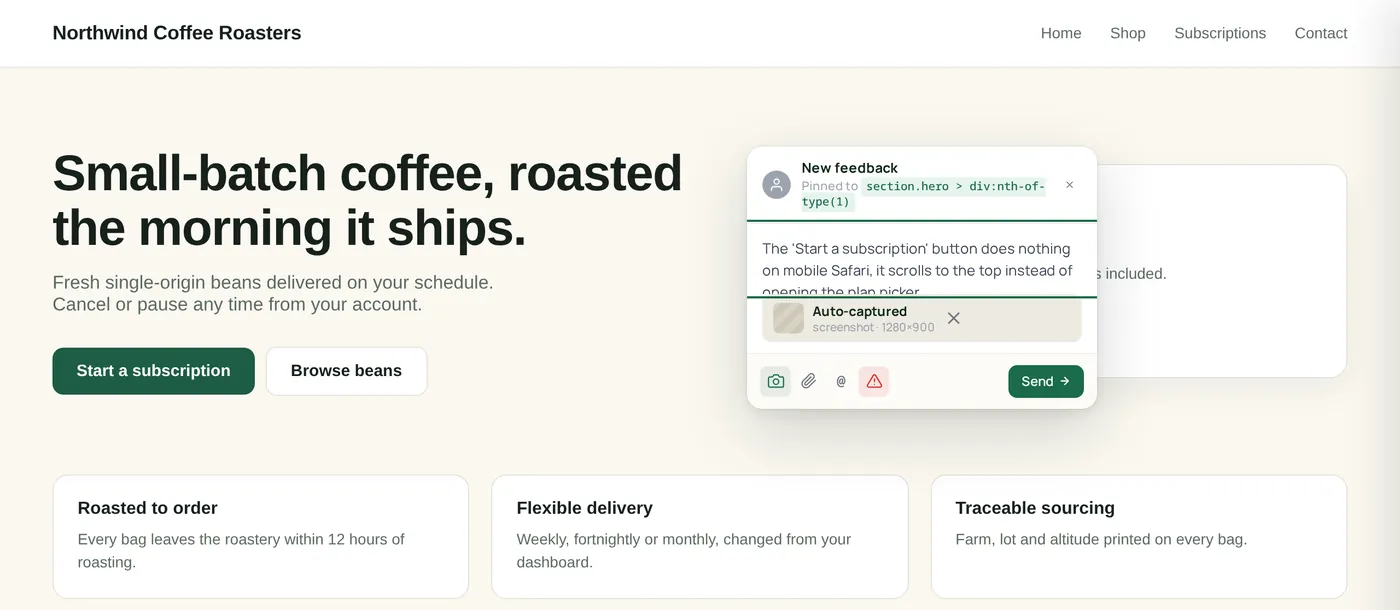
- Page URL, browser, OS, and viewport travel with the note automatically
- Review happens where the work already is, in the browser
- Fewer clarifying replies, because there is nothing left to clarify
Why it works
Feedback is only as good as the context it arrives with
Most revision churn is not disagreement, it is interpretation. Visual feedback removes the interpretation step by keeping the comment and the thing it refers to in the same place.
What arrives
"The spacing under the headline looks wrong on the homepage."
What your team works from
A comment attached to the headline block, recorded at 1440x900 in Chrome, on the exact URL the reviewer had open.
What arrives
"The CTA is broken, I think it was on mobile?"
What your team works from
A comment on the CTA element with the viewport the reviewer was using recorded alongside it.
A screenshot is attached as well when the page supports capture.
Real screenshots
Visual feedback, end to end
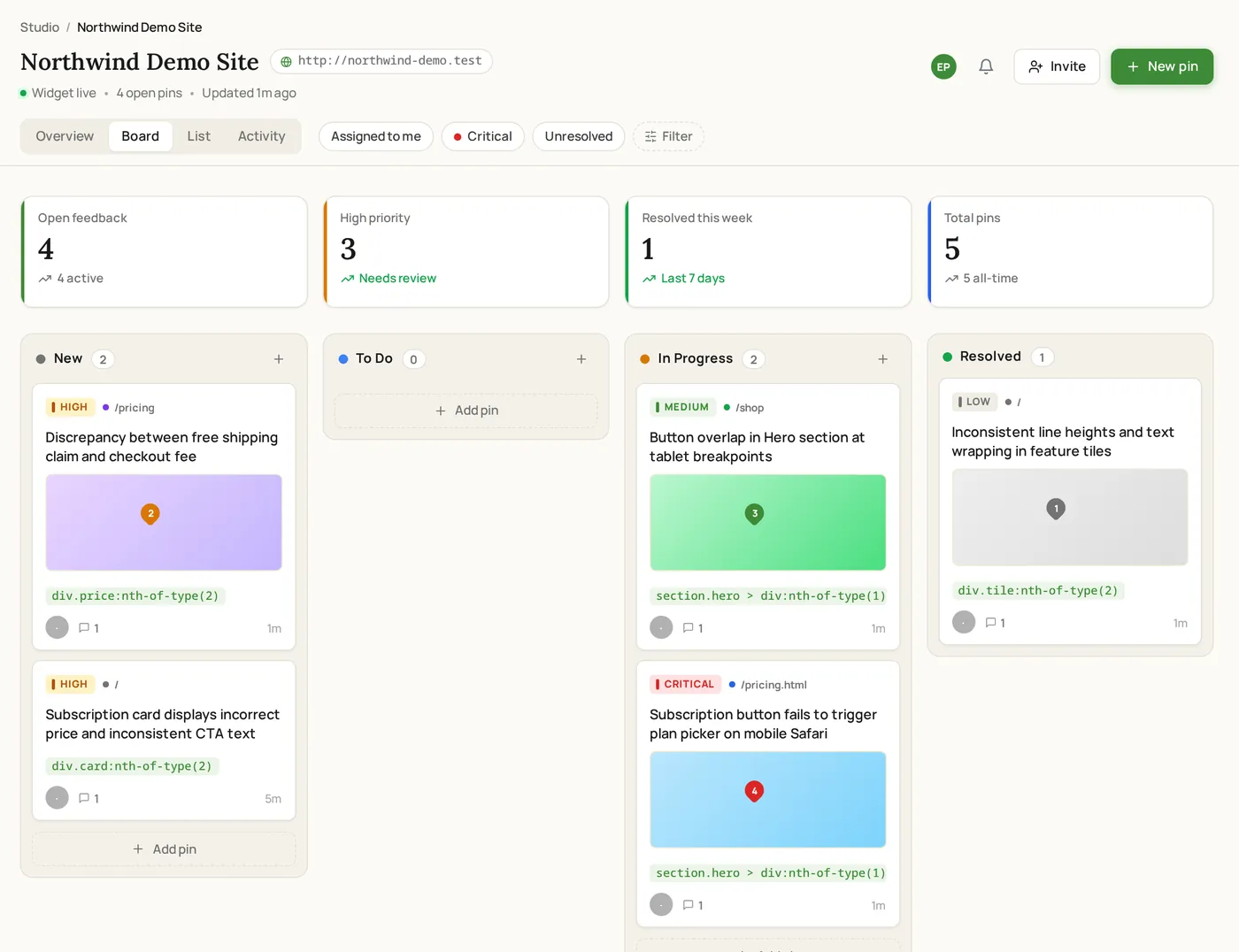
A comment pinned on a live page, and the same feedback arriving as a tracked item in the project board.
How it works
How a visual review round runs
The review happens in the browser, on the real page, at the size the reviewer is actually looking at.
Put the page in front of reviewers
Make ClickCues available on the page under review, either through the widget on your site or a shared feedback link. Reviewers open the page the same way a visitor would.
Reviewers point instead of describing
A note about the hero headline is left on the hero headline. The comment carries the page, the element, the browser, and the viewport, so its meaning does not depend on how well it was written.
Your team reads it in context
Open the item and you see the page it came from and the element it points to, next to the comment thread. Understanding the request no longer requires a follow-up message.
Features
What makes a comment unambiguous
The comment stays with the thing it is about
A visual comment is anchored to the page and the element it was left on. There is no separate document to cross-reference and no need to re-describe the location in a ticket.
You can see what the reviewer was seeing
Page URL, browser, OS, and viewport are recorded with the comment. A mobile-only observation reads as a mobile-only observation instead of a mystery.
Discussion stays attached to the request
Replies, follow-up questions, and the resolution live on the same item as the original comment, so the history of a change is readable months later.
On the pricing page mobile view, the primary CTA overlaps the paragraph below.
Every visual note becomes a piece of work
Comments arrive as items with a status, priority, and owner, so a review round ends with resolved work rather than an unread thread.
At a glance
What a visual comment carries
Who reviews this way
Teams where interpretation is the bottleneck
Keep exploring
Where visual feedback fits in the workflow
- Website annotation tool
The mechanics: marking a specific element and attaching a note to it.
- Website feedback widget
How ClickCues gets onto the page reviewers are looking at.
- Feedback board
What happens to a visual comment once it has been submitted.
- Design feedback for designers
Visual review applied to design work in the browser.
- How ClickCues works
The full workflow from setup to resolved revision.
FAQ
Questions about visual review
Last updated: August 2026
Stop translating feedback. Start seeing it.
Start your 7-day free trial and run your next review round on the page instead of in an inbox.